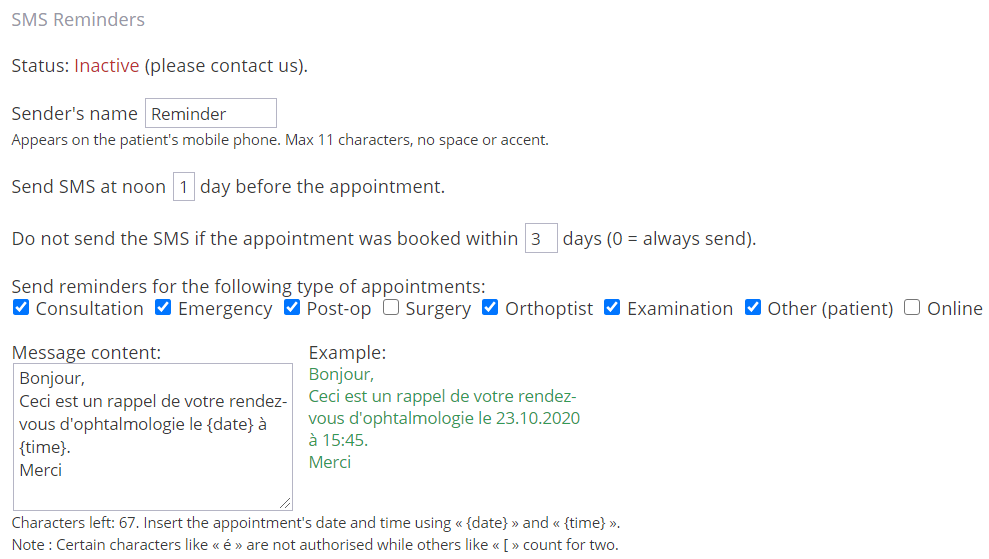
The options for SMS reminders are located in the preferences menu then in the Cabinet tab.
To access the preferences, click on your username at the bottom right of the application.
SMS reminders :
The status indicates whether the functionality is active or inactive.
If you haven't already done so, contact us at support@liris.ch to activate it.
To let your patients know who reminds them of their appointment, enter a name that identifies you.
SMS reminders are sent at noon 1, 2 or 3 days before the appointment date, depending on the option chosen. Thus, if the parameter is a 3, the SMS will be sent on Monday for an appointment on Thursday.
To avoid annoying your patients, you can choose to not send a SMS reminder when the appointment is near in time.
Just below you can choose which type of appointment will have the SMS reminder active when creating an appointment.
Changing these options will affect all appointments of the selected type.
Remember that you can choose to send the SMS reminder of each appointment individually in the right pane in Calendar view.
Text fields are limited by SMS technology, 11 characters for sender's name, 160 characters for message.